Schools will shortly be able to access the new financial year in Access Budgeting, with this due to go live overnight tonight (2nd March 2026)
Please use the School Budget Share calculator to verify the funding values in the software.The calculator can be found on the ‘Budgets’ page, via this link: Budgets – Support for schools and settings
Financial Year
You can switch between financial years via the Manage Budgets page, using the drop down menu in the top right-hand corner.
Scenarios
Pupil Numbers
Before upgrading a scenario into the new financial year, please consider extracting the school pupil number data from your current working scenario, as these will need to be keyed into the 2026/27 scenario once upgraded. The default pupil number data in the upgraded scenario will be from the Local Authority APT submission. To extract the pupil number data, please see below:
Open current scenario in FY 2025/26 and find the Pupil Number option in the menu on the left:
Go to ‘School’, ‘Scenario’, ‘Budget Planning’ then ‘Pupil Numbers’, then ‘Export to Excel’ on the far right.

Upgrading/Bringing Scenarios Forward
If you wish to bring a scenario forward from 2025/26 you have to be in the 2026/27 year and click Upgrade Scenario – where you will be presented with a drop-down list of your Scenarios available for upgrade.
Missing Year Groups
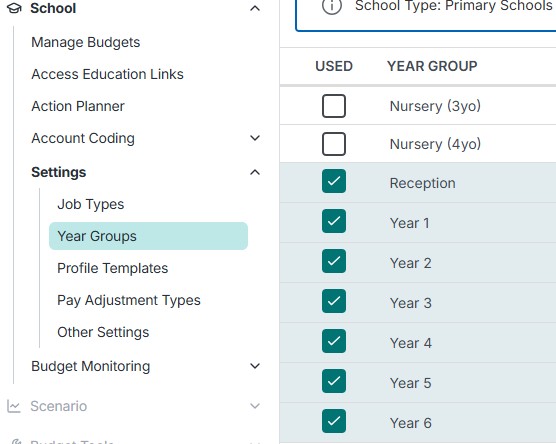
If a school identifies a missing year group in their pupil number listing once they upgrade a scenario, please use the below option in Access to add the missing year group into the scenario:
Under the ‘School’, choose ‘Settings’, then ‘Year Groups’ and select the relevant options for your setting.
Prior Attainment
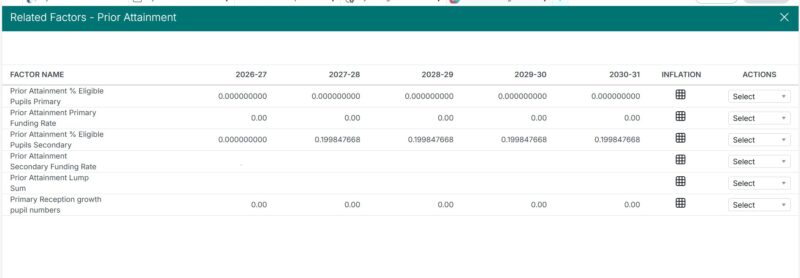
Please check this is correct into the second and third years and beyond, as a factor may be applying to the total.
Go to Scenario, Budget Planning, Budget Share, and then under ‘Actions’ column, select ‘show factors’ from the dropdown box. In this screen, you can now clear any factors to zero as necessary, correcting values back to the SBS calculator rates. See screenshot of factors below:
Actions for Schools
Review SBS calculator against Access Budgeting 2026/27
Review grants included in the upgraded budget, such as Core Schools Budget Grant and NI Grant, now rolled into SBS.
Forecast carry forward as it will be 0 in 2026/27
Pupil Numbers – Review numbers and update as required.
Review pay awards assumed by Access
Deadline
Approved budget plan to be locked and published no earlier than 1st June and by 30th June 2026